

A 2.6.4 that turns into a 2.7? Why not… Here’s a slightly heavier major: 5 new features, a firewall bumped to 8G, backups that finally leave the web root, 3 security fixes, and a bunch of improvements.
SecuPress 2.7
Disco is the Mark XXVII, an Iron Legion armor from Iron Man 3. Tony built it for stealth: a chameleon-style camouflage system, blue and orange, hence the nickname, because it looks as much like a disco ball as a lizard blending into the scenery. It’s not there for front-line combat. It’s there to stay unseen, or, the other way around, to see clearly what’s going on around it.
This 2.7 sits somewhere between the two. On one side we finally show the system status, and you can even take the armor off for 30 minutes if you need to breathe. On the other, we hide better what should not leak: cookies in reports, whether an email exists when unbanning, backups outside the web folder, an export that no longer takes the logs with it.
Pause security
Yes, you read that right. A button to turn SecuPress off.
Before you scream: settings don’t move, nothing is disabled for good. Only the PHP modules stop. Rules already written in .htaccess or robots.txt stay in place. After 30 minutes, everything comes back on its own, if you haven’t done it yourself. After 5 minutes, an email is sent anyway to the administration address to warn that security is still paused, just in case it wasn’t you.
Why 30 minutes? Because that’s the length of a debug session, a plugin throwing a fit, a contractor who “just needs it to go through”. Long enough to work, short enough that nobody leaves the armor in the locker. Both durations are filterable if you really need something else.
The button is on the welcome module, with the number of modules involved. A confirmation shows up before you confirm, this is not a “missed click”. While paused, the admin bar turns pink, a banner reminds you the site is exposed, and you can resume immediately.

security status
This is not a “deactivate the plugin”. It’s a House Party Protocol in reverse: we put the armor away, JARVIS puts it back on by himself.
“System Status” widget
Since 2.3 we’ve had a blocked-attacks gadget on the dashboard. The counterpart was missing: a site status check, without digging through five screens.
The new “System Status” widget lines up WordPress, HTTPS, PHP, the server (Apache, Nginx, IIS, LiteSpeed), whether a physical robots.txt exists, .htaccess or web.config, the number of active SecuPress modules, the date of the last scan with the grade, live connected accounts, and the number of administrators. If something’s off (PHP too old, HTTPS missing in prod, security paused, license expired), the row goes to warning or danger, with an explanation on hover.
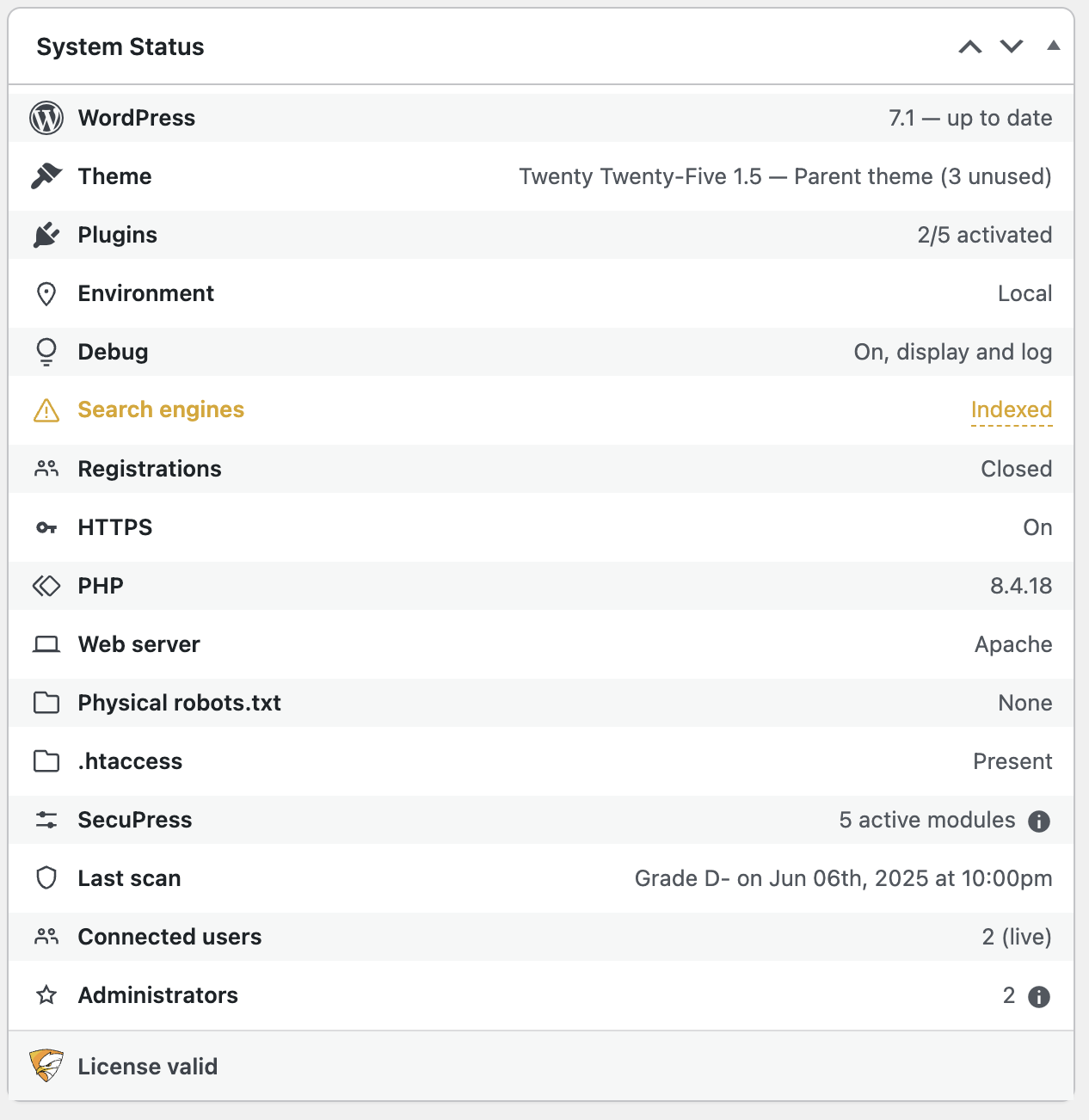
system status
This is the kind of thing I wanted for myself, in support, and that you’ll open once a week to check nothing has drifted. The attacks widget stays where it is; a small icon from the security status sends you there.
Application password alerts
WordPress has allowed application passwords for the REST API for a while. Handy. Just as handy for someone who already has profile access and crafts a key behind your back.
New module, automatically activated on the Pro update: as soon as an application password is added to an account, the owner gets an email with the application name. If it’s an administrator, the site administration email is notified too.

application passwords
Nothing to configure. If it wasn’t you, you revoke it. If it was you, you ignore it. Simple, and it’s missing from core (apparently that’s coming…).
Anti Hotlink, expert edition
The module has been around for a long time: stop other sites from embedding your images and sucking your bandwidth. In expert mode, it finally has options.
Three behaviors when someone hotlinks:
- 403 error, recommended
- Replacement image (our little “hotlinking” pictogram)
- Transparent 1×1 pixel, the old behavior, marked Legacy
Plus a list of allowed referers, search engines and networks, so Google, Bing, DuckDuckGo, Qwant, Facebook, X, Slack, LinkedIn, Discord and a few others can still display your media. Everything is checked by default, you uncheck what you don’t want.
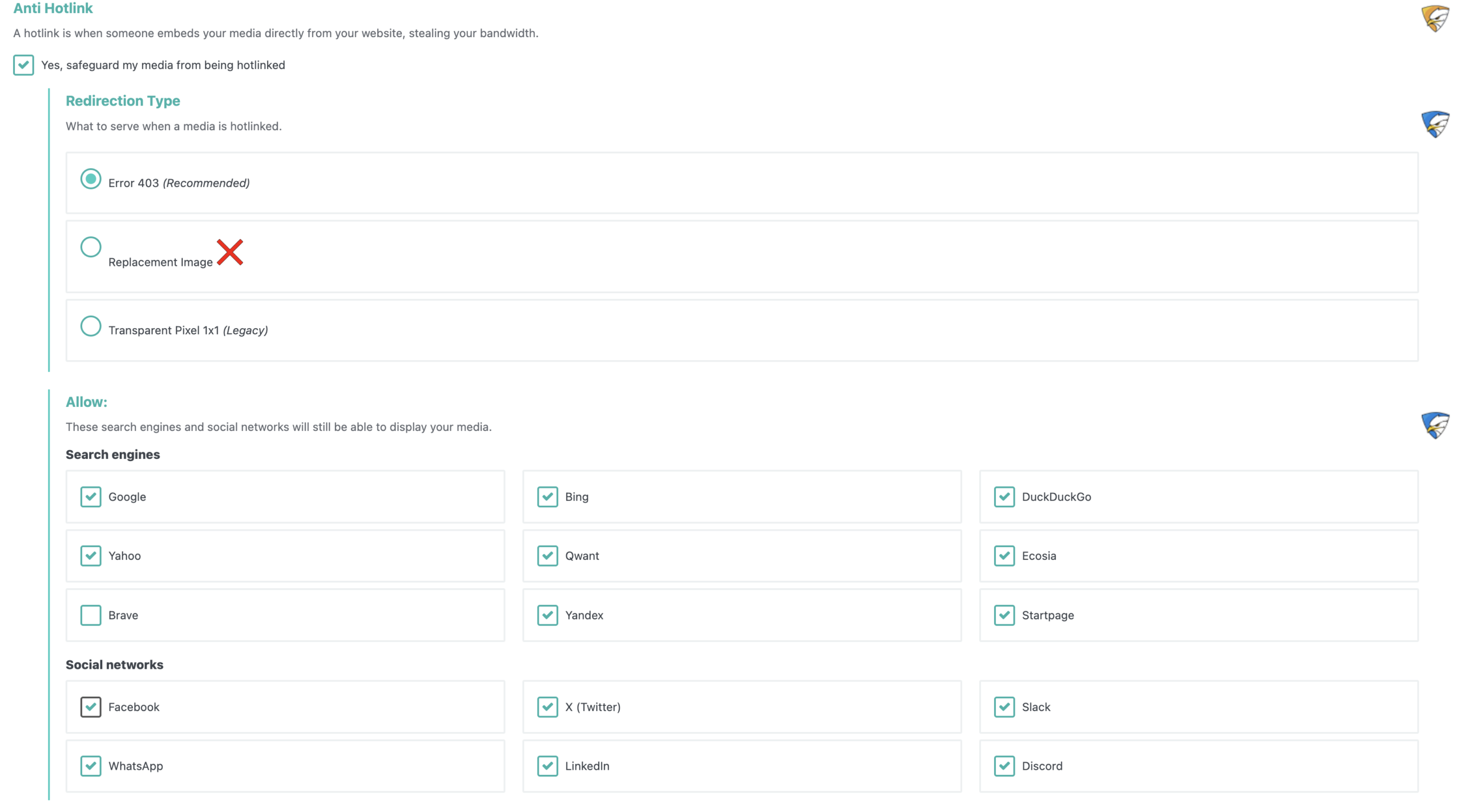
anti hotlink
Still HTTPS-only, still expert. If you don’t know why you’re touching this, don’t touch it.
Backups: off the web, and a password on the ZIP
Two major changes in the same module, both going the same way.
First, the location. When possible, backups are now (finally) stored above the web root, not in a folder anyone could try to reach. If open_basedir or permissions forbid it, we fall back to the old location with the usual warning: delete them as soon as you’ve retrieved them. On update, the existing folder is migrated.
Then, optionally, a password on the ZIPs. The secret is not in the database options, it goes into a wp-config.php constant generated for the install. AES-256, so you need PHP 7.2+ and libzip 1.2+. The password cannot be recovered: keep it somewhere safe. Old ZIPs keep their own generation. To remove the protection, you type the current password again and leave the new one empty. Three wrong attempts and it’s locked, with a reset link by email.
A backup in wp-content with no password is a backup waiting to be downloaded. Here, even if the file leaks, it stays an encrypted ZIP, and ideally it isn’t even in the web root anymore.
8G Firewall
The internal firewall updated again on Perishable Press’s 8G rule sets: query, URI, host, cookie, user-agent, referer. This is not “we added three regexes”, it’s the current set, loaded from our data files, so we can evolve it without waiting for a major, as usual.
On the same pass, sensitive cookie values are masked in block reports. You see that a cookie triggered a rule, you no longer see the secret in clear text. Same on the self-unban side: the unban email no longer says whether the address exists or not. Less enumeration, less leakage.
The crumbs
- Strong passwords now also apply on the reset form.
- Export / import now only outputs configuration keys. No more logs, transients, scans, or banned IPs in the file. You migrate settings, not a site’s history.
- HTTPS redirection now writes IIS rules correctly.
- A manual malware scan is no longer killed by a scheduled deactivation that landed at the wrong time: we know where the scan comes from.
- Fallbacks if the PHP
mbstringextension is missing. - Forbidden file extensions list updated.
- URL and rewrite fixes for subdirectory, subdomain, relocated
siteurl, and WordPress in its own directory installs. That affectedreadme.html, changelogs, bad URL/file access, Move Login. - Account enumeration: REST routes, language prefixes like
/fr/, and?_embed=. - Fatal
is_processing()if WooCommerce ships an old async lib: again (yes, again). - Bad themes deactivation hooks, admin unlock message, a plugin back on the repository still listed as closed, Fake Google Bots filter, rewrite bases return type, database malware scan mixing string and array, PasswordLess option removed cleanly.
3 security fixes
These deserve their own line, they’re in the “What’s new” notice for a reason:
- Unauthenticated authentication bypass via the
secupress_auto_login_tokenparameter. The related transients are purged on update. Thanks to the Wordfence team. - Possible RCE when writing constants into
wp-config.php. - SQL injection as an administrator when deleting logs.
Update. This is not a suggestion.
Requirements
SecuPress 2.7 requires WordPress 5.5 minimum and PHP 7.3 minimum. If you’re still below that, this is no longer a SecuPress issue, it’s a hosting issue.
2.8 will have HTTP logs, the date is already booked as soon as possible, the beta was already underway!


